
Google has launched 'Take Notes for Me' on Google Meet, an AI-powered tool that takes notes automatically during meetings so that attendees can concentrate on the conversation without missing anything important.

The days of hastily taking notes on everything your employer said in a meeting are long gone. With the release of Google Meet's "Take Notes for Me" function, Google is upping the ante. With the help of this new AI-powered technology, you can stop worrying about forgetting any vital facts and concentrate fully on the topic as it will automatically record all the relevant points from your meetings. These notes are collected neatly into a Google Docs file following the meeting and appended to the calendar event, so that everyone in your company may easily view them at a later time.
The "Take Notes for Me" feature: what is it?
Using the "Take Notes for Me" feature in Google Meet, attendees may focus on conversations, teamwork, and presentations as the technology automatically creates meeting notes. These notes are stored in a Google Docs document following the meeting and are linked to the relevant calendar event. Participants in the same organization have access to the notes, guaranteeing that crucial information is noted and readily available for follow-up.
How It works
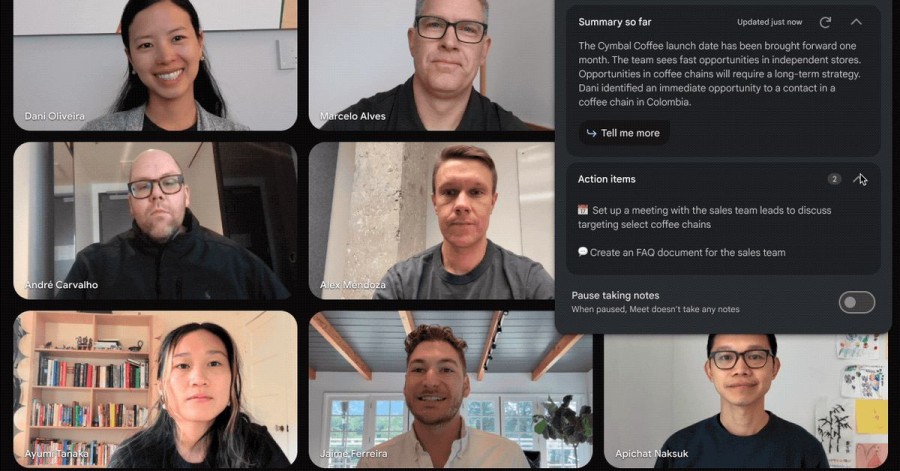
When activated, the function instantly records the main ideas and conclusions of the meeting. A "summary so far" function allows attendees to catch up if they arrive late for the meeting. A handy summary is provided by the notes, which are emailed to the meeting organizer and everyone who activated the function after the meeting. A thorough record of the meeting is provided by the notes document, which links to any recordings or transcripts of the meeting that were made.
Google has launched 'Take Notes for Me' on Google Meet, an AI-powered tool that takes notes automatically during meetings so that attendees can concentrate on the conversation without missing anything important.
The days of hastily taking notes on everything your employer said in a meeting are long gone. With the release of Google Meet's "Take Notes for Me" function, Google is upping the ante. With the help of this new AI-powered technology, you can stop worrying about forgetting any vital facts and concentrate fully on the topic as it will automatically record all the relevant points from your meetings. These notes are collected neatly into a Google Docs file following the meeting and appended to the calendar event, so that everyone in your company may easily view them at a later time.
Accessibility and Configuration
Customers of Google Workspace with the Gemini Enterprise, Gemini Education Premium, or AI Meetings & Messaging add-ons can use "Take Notes for Me". This functionality is enabled by default for administrators and can be controlled at the group or organizational unit (OU) level. End users can make sure that meeting notes are automatically taken by enabling it beforehand through the Calendar invite.
This feature will be gradually rolled out; it may take up to 15 days for all users to see it. Customers with Scheduled and Rapid Release domains can access it.The "Take Notes for Me" function in Google Meet is an effective tool that streamlines the meeting procedure and lets users concentrate on other tasks while the AI takes care of taking notes.
This feature's main benefit is that it lets users participate more actively in meetings without having to worry about missing anything crucial. The note-taking procedure can be automated, freeing up participants to concentrate on the discussion and teamwork while the AI takes care of the background note-taking. This function is especially helpful in large or complex meetings where it might be difficult to maintain track of topics.

© 2026 Bharati News | All Right Reserved